SMS Consent & Opt-In
Legal Entity: CaravelIQ LLC | Registered: 1209 Mountain Road Pl NE, Suite R, Albuquerque, NM 87110, USA
Last Updated: November 2026
1. About This Policy
CaravelIQ LLC ("CaravelIQ," "we," "us," or "our") operates CampanaOne, a Critical Event Management platform used by enterprise, government, healthcare, education, and other organisations to deliver emergency, business continuity, duty of care, and operational communications to their employees, contractors, and authorised stakeholders.
Recipients opt in to SMS alerts themselves through CampanaOne's web sign-up form (described below), or are added by their organisation with their consent recorded. Our customers — the organisations who deploy CampanaOne — remain responsible for obtaining and maintaining appropriate consent from their employees, contractors, authorised stakeholders, or other recipients before sending SMS messages through the platform.
2. How Consent Is Obtained
Texts from CampanaOne: CampanaLight trial sign-up
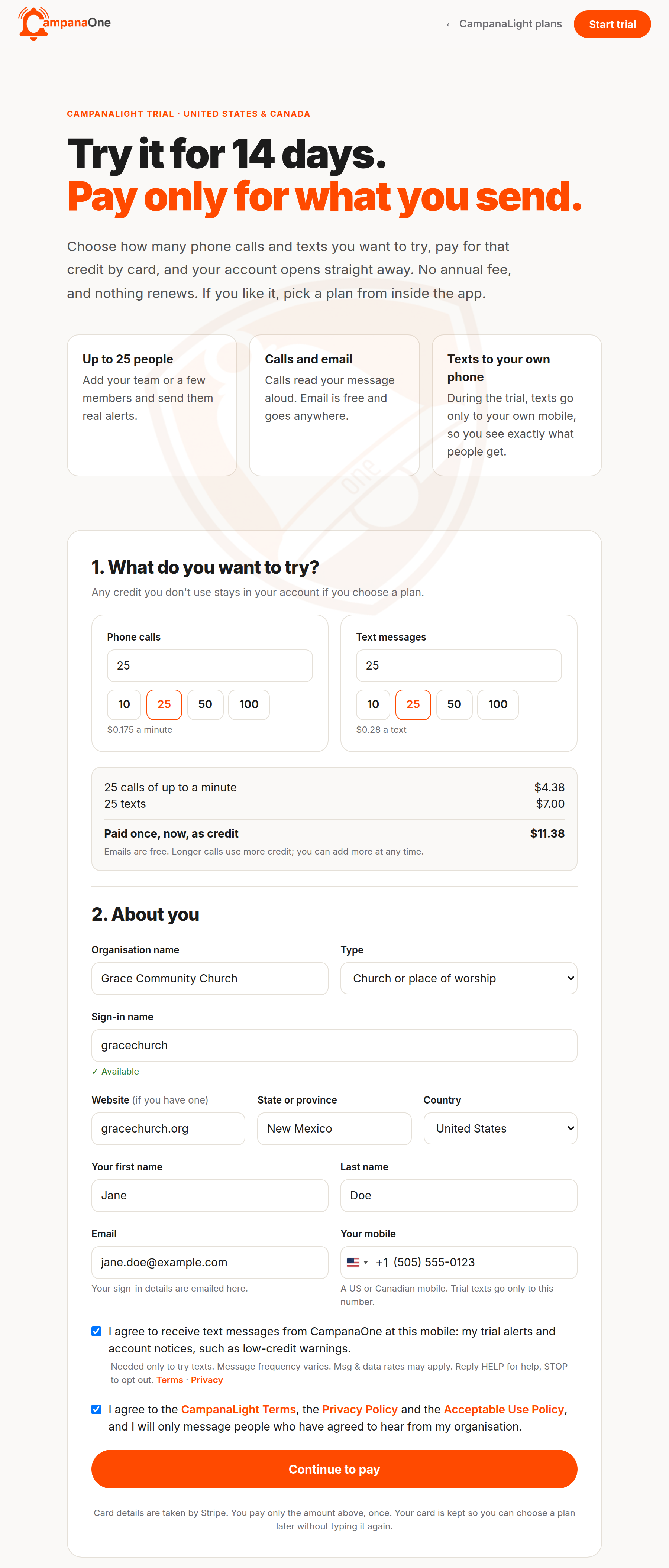
CampanaOne's own toll-free number (+1 888 921 0009) sends only CampanaOne's own messages: sample alerts during a CampanaLight trial, and account notices such as low-credit warnings. They go to one mobile per account, the one the trial user gives on the CampanaLight trial sign-up form on campanaone.com. On that form, the trial user:
- Enters their name, email address and mobile number under About you.
- Ticks the SMS consent box directly under the mobile number: "I agree to receive text messages from CampanaOne at this mobile: my trial alerts and account notices, such as low-credit warnings." The box is unticked by default. It is needed only to try texts: a trial with calls and email only can be started without it, and then no texts are sent to that mobile at all.
- Reads the disclosure shown directly beneath the box: "Message frequency varies. Msg & data rates may apply. Reply HELP for help, STOP to opt out.", with links to the Terms and Privacy Policy.
- Separately agrees to the CampanaLight Terms and pays. The SMS consent and its date and time are recorded against the account.
Alerts from an organisation: web sign-up form
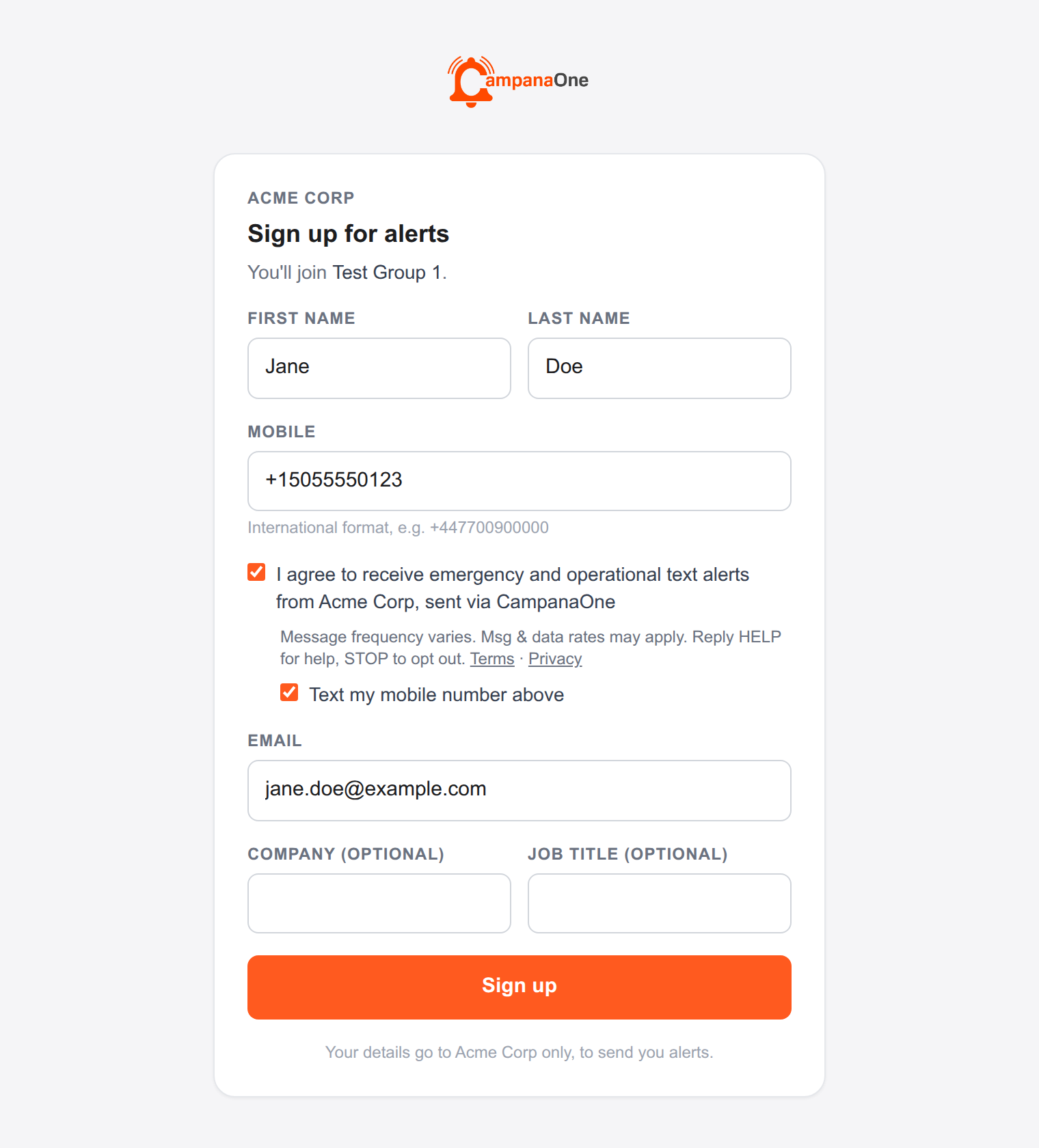
An organisation using CampanaOne shares a sign-up link or QR code with its people (for example on a staff noticeboard, in an onboarding pack, or on its intranet). The link opens a CampanaOne-hosted form at app.campanaone.com/register/…, showing the CampanaOne logo and the organisation's name. The recipient:
- Enters their first name, last name and mobile number.
- Ticks the SMS consent box: "I agree to receive emergency and operational text alerts from [Organisation], sent via CampanaOne". The box is unticked by default and is optional — the recipient can sign up without it, and their number is then not used for text messages.
- Reads the disclosure shown directly beneath the box: "Message frequency varies. Msg & data rates may apply. Reply HELP for help, STOP to opt out.", with links to the Terms and Privacy Policy.
- Presses Sign up. The consent, its date and time, and the number it applies to are recorded against the recipient.
Consent collected by the organisation
Where an organisation adds a recipient itself, consent is collected and documented by that organisation. Acceptable consent mechanisms include:
- Employee onboarding processes
- Human Resources systems
- Employment agreements
- Internal company policies
- Electronic consent forms
- Other documented consent mechanisms maintained by the customer
Customer organisations are required to retain records of how and when consent was obtained, and to honour opt-out requests promptly. CaravelIQ does not sell, share, or transfer phone numbers or consent records between organisations.
CampanaOne also enforces consent capture directly at the point an SMS number is added to a recipient record. An administrator must record one of two consent types before a number can be saved — self-consent from the recipient, or administrator attestation that consent was obtained through an offline process (e.g. onboarding paperwork). A number cannot be stored, and no message can be sent to it, until this is recorded.
3. Permitted Use of SMS
CampanaOne is intended solely for legitimate operational communications. Permitted message types include:
- Emergency notifications
- Business continuity alerts
- Duty of care check-ins
- Severe weather notifications
- Evacuation instructions
- IT service notifications
- Operational updates
CampanaOne is not used for marketing, promotional, or unsolicited messaging of any kind. For full details on prohibited content, see our Acceptable Use Policy.
4. Opting Out
Where applicable, recipients may opt out of SMS communications at any time by following the instructions included within the message, such as replying STOP. Full instructions, including all supported keywords and how to opt back in, are available on our SMS Opt-Out Instructions page.
5. Related Policies
This policy should be read together with our:
6. Contact
For questions about this SMS Consent & Opt-In policy or to submit a compliance inquiry:
- Email: compliance@caraveliq.com
- Mail: CaravelIQ LLC, 1209 Mountain Road Pl NE, Suite R, Albuquerque, NM 87110, USA